

ADOBE KEYBOARD SHORTCUTS
PROJECT BLOG
Interactive Media 1
Professor: Stephen Schaf
School: University of Colorado Denver

9/30/19
The Pitch moved
Originally, we were supposed to have our Pitch presented today, however due to the last project some individuals including myself was not ready to present. I was able to work on majority of the presentation but I still had a few I was not able to include. Thankfully, Stephen Schaf (professor) moved the Pitch to Wednesday. Starting off the class with the announcement, we then moved on to a lecture on goal directed design. Reviewing over our textbook "About Face" by Alan Cooper.

10/2/19
The Pitch
Today we presented our ideas for our final in front of the entire class. As much as I want to say I did a good job, I didn't. I stuttered a lot and was honestly lost with what I was saying. My presentation felt very rushed and I didn't research what exactly the end goal of the app should have been. I could have been much more productive researching more than just the competitions out there. After my presentation, Stephen was a little confused as to why this app should go through. It did make sense we can look up the Adobe keyboard shortcuts online or even on youtube, but I wanted to do something more mobile based. Today, the most important object we tend to carry. around is our phone. Knowing that many carry their phone around instead of everything else, I would want a mobile version of these shortcuts so that it is conveniently there. A classmate suggested an app where it teaches you through quizzes or through games. Personally, I loved that idea and that way my app wouldn't be just information based but also very interactive. Concluding my presentation with the new app idea, Stephen also agreed that was a better choice to go through with.
10/7/19
Sketches during class
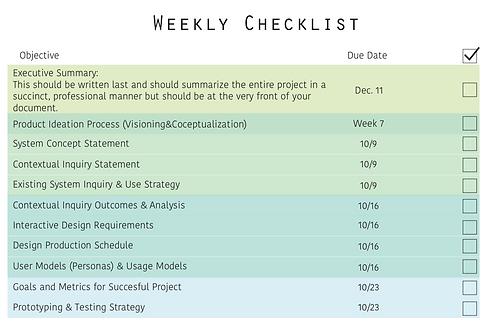
During class today, we went through the final project requirements along with the. timeline of what we should get done for each week. While Stephen was talking to the class about the requirements, I did some small wire framing sketches. While I was sketching out my ideas, I realized how much work and time I needed to work on this prototype. Sketching this out helped me focus on what I wanted to do for the layout of the design.

10/10/19
Problem and Vision Statement
Working on the Adobe Creative Cloud keyboard shortcuts is difficult to the amount of information. The organization and the flow of the app will be essential to create an environment where the user can easily navigate throughout the app. During the pitch, I had presented to give out Illustrator, InDesign, and Photoshop keyboard shortcuts however, as I tried to put the information into one app, there was a lot more information that had to put for just one program. Debating whether or not I should continue to add more information for the other two programs or to make it a tad simpler by using one program only. Using universal buttons on the app to make the use of the prototype easier and to add two characters to create a more fun learning environment than the typical flash cards or the quizzes.

10/11/19
Exploring through Brainstorm
I ended the my first set of sketches today. As I flip through the pages, I can see all the notes I wrote down while I was sketching each page of the prototype. As I was sketching for each page, this process helped me notice certain pages I missed from just thinking about the pages. I put down notes on each page to make sure I didn't miss anything. I did a quick brainstorming by myself and I did get a few ideas onto my sketches. I do want to brainstorm with a couple of my friends to get any other ideas that would help.

10/12/19
System Concept Statement
Concept: The only Adobe keyboard shortcut app that teaches the user.
Details: This app will teach the user keyboard shortcuts in sections. There will be a small character that will guide you throughout the lessons. Towards the end of studying through quizzes and games, you will take a test to see if you have memorized them completely. Towards the end of learning the shortcuts, there will be a reward of some sort.
Goals: To create an easy app and yet interesting to get the users to want to continue using the app and to learn them with ease.
Risks: The user could rather want to memorize it faster on their own than spending time on the app. The user could always search it up instead. The user might not care about having to know the shortcuts.
REQUIREMENTS DEFINITION

10/14/19
Persona Revision
Brittney York
Age: 19
Personality: Introverted, loves small talk, diligent
Bio: I would love to work on my projects with a lot of focus. I lose myself when I am working on the projects. I take a lot of time doing one action since I have to look it up every few times. I wish I knew some shortcuts a bit better so that my work flow would be easier.
Lifestyle: A cup of coffee is the best way to start my morning off. I get some breakfast in to boost my energy to roll myself into class. I stay up late to work on my projects since I work right after my classes.
Quote: A cup of coffee always helps the day.

10/14/19
Persona Revision
Mary Wilson
Age: 28
Personality: Outgoing, Talkative, Positive
Bio: I am finally at my dream job as an apprentice. It took a long way to get her but I am finally here. I didn't like working on the digital parts of the progress because I took too long. I know where everything is but I wish I spent some time learning the keyboard shortcuts for some of the actions. Speeding my process up. a tad bit is crucial right now because we are always. on a time crunch.
Lifestyle: I stop by Starbucks to get my Caramel Macchiato with an extra espresso shot. I love that bitter coffee taste in the morning to get myself pumped up for work.
Quote: Make the most out of each day!

10/14/19
Persona Revision
Terry Smith
Age: 42
Personality: Serious, Thinker, Outgoing
Bio: Being one of digital designers at a top company is definitely the dream job. My colleagues and I always get along. I work on my projects with ease. I know some of the keyboard shortcuts but would definitely help if I knew more so that I could work on each project with more efficiency. I want some time to be able to learn some more keyboard shortcuts to increase my efficiency.
Lifestyle: I wake up to my wife cooking up some breakfast. Having some small talk with my wife, I drop off my kid at his school and head on my way to the company. I make sure I get my ID out to get in without wasting any time. I prioritize the time I spend in the office to get what needs to be done completed.
Quote: Time is essential to everything you do.

10/14/19
Problem Statement
My top concern is how to incorporate a simple match making game into the app. I want the information on the cards and a small design of the app on the back. I am concerned with how to incorporate something into the app without having to pay for the app to include motions. Hopefully when I reach that part of the prototyping, I will have an idea on how to be able incorporate it into the app. If unable to incorporate I will conclude to take the game section off the app.
The current vision for the app is about one set of keyboard shortcuts for one Adobe program which is Illustrator. If this app were to be a success for the first set of information, I would like to add a second set of information for the remaining Adobe programs for a certain amount of money. As of right now, the app will be free to see how the app will do and how the users like the app. Many of apps have a certain set of information free but for more the user would have to pay.

10/16/19
Vision Statement
This app will get the users to constantly get onto the app to learn more and more of the keyboard shortcuts without having to spend too much time on the app. The app will send notifications to your device when you are on your screen or even a timed notification to get you on the app. Helping the user get onto the app and focus on learning the shortcuts with the least amount of time needed. The app itself will have three options in which shorts the user would like to learn. Mac, Pc, or both options will pop up before you go over to your home page. The home page will be the progress page. The hamburger menu will be used to direct them into their next steps of their progress. This app will be an engaging but useful app. The end goal for this app is to be still. on the users device even after learning all the shortcuts. The users will have an option to take quizzes from time to time to ensure they have the shorts memorized.
10/16/19
Brainstorm and Explore
Rather than brainstorming for more ideas, Kate Fox and I talked about parts of the sketches we each needed. As I pointed out that she needed a back button or even a way to go back to the home screen, I realized I did not have one either. She pointed out that my sketches were very simple on version while version 2 had some more characters and was a little more detailed into. At the end of the prototype, I. realized that there needed to be a progress page for which the users to keep track of themselves to see what they got done of the course or even the entire app. As she went through the interview for hers, I realized that I needed a search button or a separate page for the users to be able to search up actions that they haven't or have learned for quicker resources. As I was talking out my ideas with Kate, there were many parts of her prototype that I said was unnecessary. I took a look at my sketches to see if I had any unnecessary buttons or actions, in which I could not find any. I asked Kate if there were any buttons that I did not need or even pages that were unnecessary. "Everything its very simple and user friendly, there isn't a button that needs to be gone" said Kate. Talking out the ideas with another person helped realize parts that I didn't think about. Pointing out someone's wireframes also helped point out what I needed in my wireframes and what I didn't.
10/16/19
Context Scenarios
Brittney York
"Listening to my alarm ring, I slowly get myself off the bed to go wash myself up. I start off with washing my face and brushing my teeth. I hop into the shower real quick to get myself clean before getting some breakfast. I walk down to the cafeteria for small breakfast. I check the time and I still have some time before class starts. I walk over to my building and am waiting for my class. Since I have some time left, I open up Adobe shortcuts to learn a few more shorts."
10/16/19
Context Scenarios
Mary Wilson
"I head out a bit rushed from my house from waking a bit late. I hop onto the bus that takes me close to my company I work for as an intern. Feeling a bit rushed, I make sure I have everything in my bag. I wanted some coffee before stepping into the office, but it's a bit too late right now. While on the bus, I look on my phone for what to do. I have my AirPods in and ready for some music. I put some music on and look for an app to go on."
10/16/19
Context Scenarios
Terry Smith
"I wake up a few minutes earlier before my alarm ring. I take a few minutes to find my glasses and get myself walking to the bathroom. Feeling a bit icky, I wash myself up and head downstairs for some breakfast. My wife plates up the food and I take 10 minutes to finish my food and another 5 minutes to talk with my wife. While she goes to wake up our son, I head on upstairs to get myself dressed. With a few minutes to spare, I take a look at the time and look through my phone to do something while I wait for my son to get ready."

10/17/19
User Task Flows
Sign up
Enter name
Enter username
Enter email
Age
Enter password
Go
Mac
Intermediate
Take a quiz before going to intermediate
Study
Flashcards
Games
Matching
Quiz
Test
Progress Page
Home page

10/17/19
Task Steps
Sign up
Name
Username
Password
age
email
Log In
Email or Username
Password
Home Page
Progress page
Option of learning
Mac
Pc
Both
Levels
Beginner
Intermediate
Advanced
Professional
Study
Quiz
Test
Games

10/19/19
Next weeks Assignments
I need to have a storyboard ready for the proof of concept video for my prototype. I have sketches of my wireframes ready and my sketches for the video. The sketches for the video is a bit simplified but I do have explanations on the side. Uploading them onto a PDF as soon as possible will be best. I need to start the PDF version of the documents so that at the end of the project, I don't need to cram everything in.
STORYBOARD SKETCHES
10/30/19
The voice over will be done by my friend, Nomin Dyadantumbe.
The music in the background music will be an instrumental song called Americano by 달달한 아이들.
Voice over script:
Digital Designers are always using Adobe programs. Adobe programs are an essential part of a designers work. Majority work with the Adobe products in order to get their images vectorize or even to edit photos. How long does it take them though ? It may even take a few hours. We see illustrations, photos, and even YouTube videos are all part of Adobe. These pieces consume a lot of time for designers, artists, or even you. Wouldn't you like a way to make these art pieces more efficient ? Consuming just a bit of time, imagine an app that teaches you keyboard shortcuts. You don't have to dig through all your papers or even try to find it online and honestly speaking you probably don't even take a look at the shortcuts when making your masterpiece.A keyboard shortcut teacher in your pocket. I present to you Adobe Shorts.


10/30/19
Started on the app using Invision, however I am focusing on the basic template first before diving into he minor details.

10/30/19
I haven't been able to get all the animations that I wanted to but I do have ideas. I am on an edge on whether I should continue it with the video as it is or to change it up. I am planning on illustrating the background and the small details rather than having them all done out on Illustrator.

11/4/19
Illustrations for the proof of concept video. I will be using illustrations on Procreate and then transferring them onto illustrator to vectorize them. After vectorizing all the illustrations I will then move them onto after affects to get the motions going. I have all the layers in procreate. As I got my friend to do the voice over, I added more and more illustrations that I thought were to be needed. I ended up changing parts of the voice over to be more engaging for the audience.
11/17/19
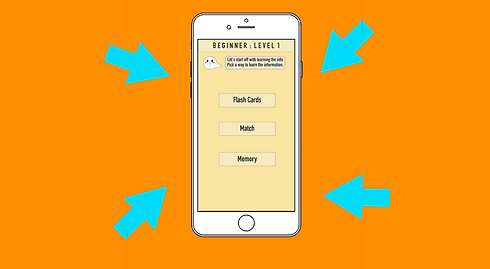
Finished the kickstarter video for the Adobe Shortcuts Project. The VO has changed due to the different style of the video.
VO Script:
Imagine,
You’re in your office or even your room. You have your computer out and ready to edit, vectorize, and be .... creative. Using you mouse to click, drag, and click. Wouldn’t you want to use a more efficient way to move around?
Knowing your keyboard shortcuts as designers, students, or even YouTubers are essential.
This app is to help you memorize these shortcuts. Teaching you the universal shortcuts and the more specific ones for the programs used.
Our goal is to reach $7,000 to make this app a reality.
For more information contact www.adobeshorts.com.
Click HERE to view the video.

11/18/19
This is your Service Description. Use this space to explain this service in more detail.
11/20/19
Illustrations for the proof of concept video. I will be using illustrations on Procreate and then transferring them onto illustrator to vectorize them. After vectorizing all the illustrations I will then move them onto after affects to get the motions going. I have all the layers in procreate. As I got my friend to do the voice over, I added more and more illustrations that I thought were to be needed. I ended up changing parts of the voice over to be more engaging for the audience.
11/25/19
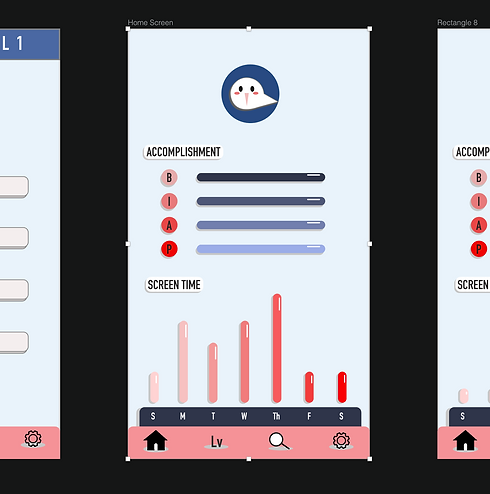
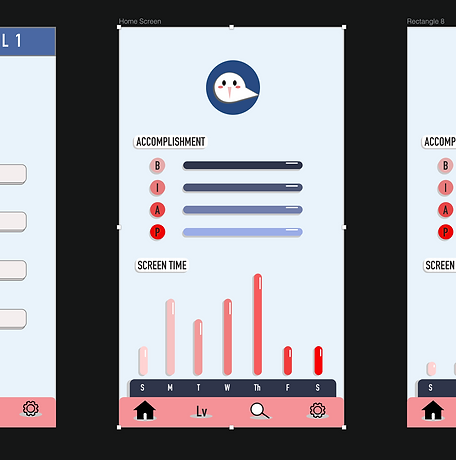
Going through the high definition wireframes, I ended up changing the colors and the style quite a bit. Having to restart the wireframes a bit, took a bit of time. Changing my wireframes meant I also had to change the proof of concept video. Fortunately this was not difficult to change.

11/28/19
Started working on my motion piece of the wireframes. Feeling pretty behind on the assignment, I completed one motion part for the loading screen.

11/30/19
Completing the majority of the wireframes, I make sure to take a look back onto the wireframes. I go through the prototype myself to find any parts that I had left out. Going back and forth I was able to complete the wireframes. Having had complete the wireframes, I try to finish the other motion track wireframes. There was a few problems trying to switch Invision to Adobe Illustrator in order to take in into after affects with different layers. I had exported over 50 times trying to get the wire frames mostly correct onto Illustrator. Although it was difficult to get them onto Illustrator, putting everything onto different layers and then moving it to after effects was fairly easier.
12/1/19
Focusing on the powerpoint for the presentation, I start on the powerpoint. I am a bit confused as to which information I need to put in. As of right now I will be putting in the user tasks flows, persona, user goals, video summary and the outcomes.

12/2/19
During class we decided present the dry run in groups. Personally, I prefer doing the dry run in groups so that I could get multiple feedbacks.
After Class:
Watching other people present helped add more information to my slides. Specifically, adding the problem and the solution.
12/10/19
Finished the PDF and the powerpoint for class tomorrow. I ended up revising a few of the slides. Originally I had the context scenarios on my slides, but it was not that important for it to be included.
View: